導約整合文件
在導約連結、使用與移除 Zoom
這份文件說明工作室老師如何從導約後台連結自己的 Zoom 帳號、如何讓已確認的線上預約自動建立 Zoom 會議、如何選擇性同步到 Zoom Workplace Calendar,以及如何解除授權。
連結位置
老師設定頁的線上會議工具區塊。
主要用途
正式成立、改期與取消線上預約時同步 Zoom meeting。
選用日曆
啟用後可建立 Zoom Calendar event,讓桌面版 Zoom Workplace 看得到預約。
資料保存
OAuth token 加密保存,私密會議資訊只顯示給授權後台使用者。
新增 Zoom 連結
- 1登入導約後台,打開「老師設定」。
- 2選擇要管理的老師。
- 3在「線上會議工具」區塊點選「連結 Zoom」。
- 4在 Zoom 授權頁確認權限,點選 Allow。
- 5回到導約後,確認 Zoom 狀態顯示為已連結。
- 6需要預設使用 Zoom 時,點選「設為預設」。
連結入口位於登入後的導約後台「老師設定」頁;公開文件不列出工作室專屬後台連結。
使用 Zoom 建立預約會議
- 1服務必須是線上服務,且使用接案老師或指定老師的會議工具。
- 2老師必須已連結 Zoom,並把 Zoom 設為預設線上會議工具。
- 3客戶送出預約申請後,免人工確認的服務會直接成立;需要人工確認的服務則由工作室管理者在後台接受該 booking。若服務要求成立前付款,系統會等付款實際完成後才建立會議。
- 4在 booking 正式成立時,導約後端會使用該老師的 Zoom 授權建立排程會議。
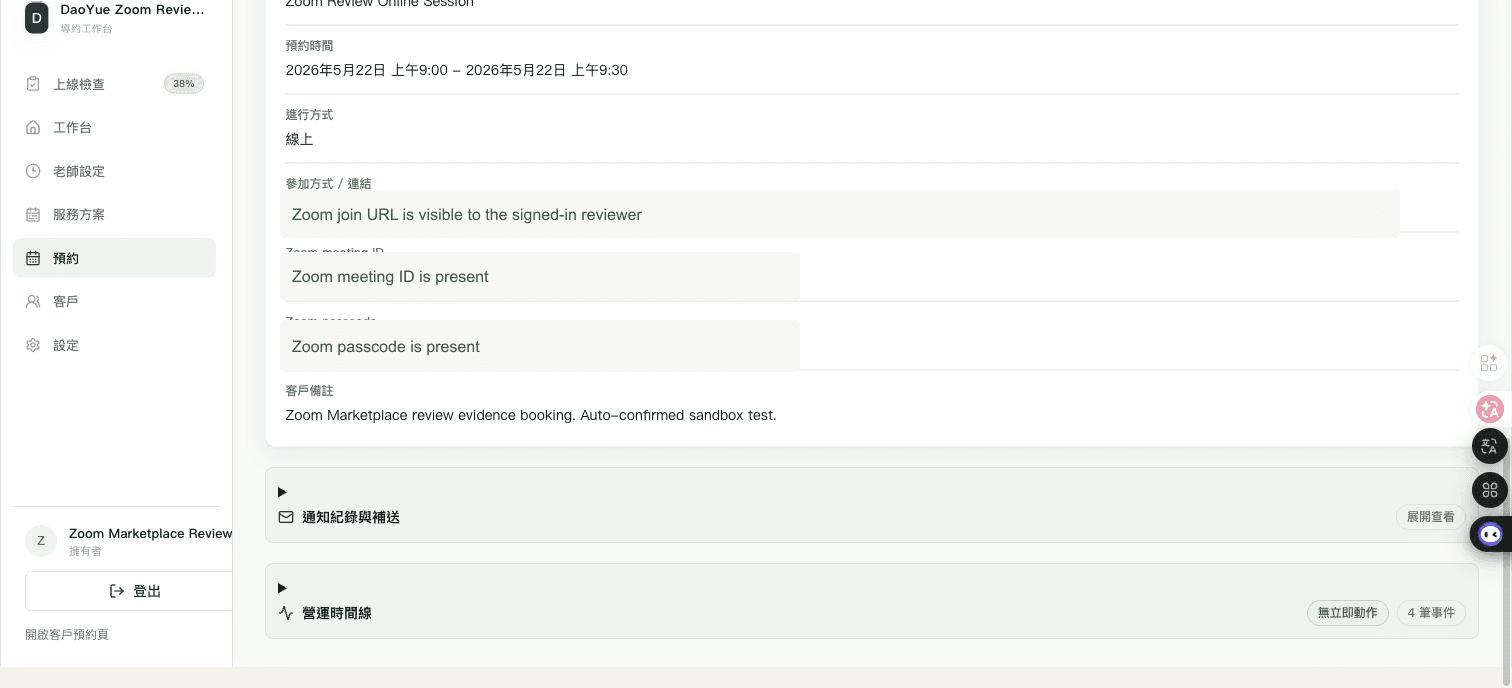
- 5建立成功後,booking 的私密會議資訊會包含 join URL、meeting id 與 passcode。
預約建立後,如果工作室在後台核准改期,導約會同步更新同一個 Zoom 會議的開始時間與長度;如果核准取消,導約會同步刪除該 Zoom 會議。
付款前通知與「我的預約」只會顯示安全的公開線上說明,不會提供 Zoom join URL、meeting ID 或 passcode。
選用 Zoom Workplace Calendar 顯示
- 1Zoom Workplace Calendar event mirror 預設關閉;既有 Zoom meeting 連結仍可照常建立會議。
- 2若老師希望在 Zoom Workplace 桌面版右側 Calendar panel 直接看到並開啟預約,工作室可在老師設定中啟用此功能。
- 3如果後台顯示需要重新連結,請從同一位老師的 Zoom 設定重新授權,讓導約取得 Calendar event 權限。
- 4啟用後,正式成立的 Zoom booking 會建立一筆 privacy-safe Zoom Calendar event;改期會更新,取消會刪除。
- 5既有已成立 booking 可在 booking detail 使用「同步到 Zoom Calendar」或「重新同步」,不會重送客戶通知。
這個功能只適合需要 Zoom Workplace desktop Calendar panel 的老師。若該老師已經讓 Zoom 自動同步 Google Calendar,而導約也會寫入同一個 Google Calendar,請不要同時啟用,否則 Zoom 可能看到兩筆同一場預約。
Zoom Calendar event 只包含服務名稱、預約識別、時間、時區與 Zoom join information;不會放入客戶姓名、Email、電話、LINE id、問卷答案、服務問題答案或內部備註。
Marketplace reviewer test flow
The Zoom Marketplace app name is DaoYue. This production sandbox is for Zoom Marketplace review only. It contains test data and uses an auto-confirmed no-payment service so reviewers can verify Zoom meeting creation immediately after submitting a booking.
Release notes test plan link: https://daoyue.app/docs/zoom/app-update-test-plan
Standalone reviewer document: https://daoyue.app/docs/zoom/app-update-test-plan. This section remains available as a fallback anchor at https://daoyue.app/docs/zoom#calendar-app-update-test-plan.
- 1Sign in at https://daoyue.app/admin/login with the reviewer account provided through the secure handoff channel.
- 2Open https://daoyue.app/admin/zoom-review/availability.
- 3For a fresh reviewer handoff, the DaoYue provider card starts disconnected. Click 連結 Zoom (Connect Zoom). If you already connected this same Zoom test account earlier in the current review, keep it connected and continue. If you did not create the visible connection or the connected account is unexpected, stop and notify DaoYue instead of manually removing it. Do not use the Marketplace Production OAuth URL; the test account's DaoYue button generates the Development Client ID authorization URL for this app update.
- 4Open https://daoyue.app/w/zoom-review from desktop Chrome or another standard browser.
- 5Submit a booking for Zoom Review Online Session. The review sandbox accepts Email guest booking for this public booking flow, so a LINE account is not required.
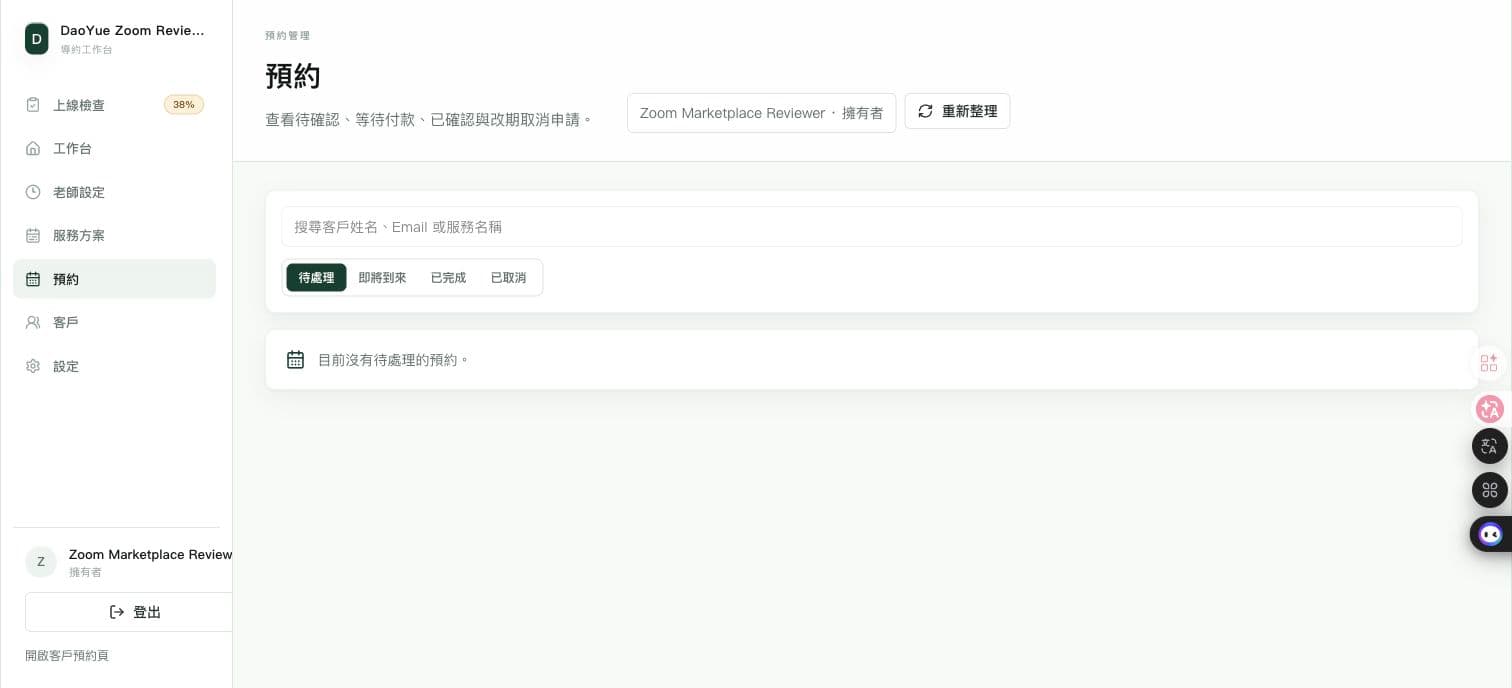
- 6After submission, open https://daoyue.app/admin/zoom-review/bookings.
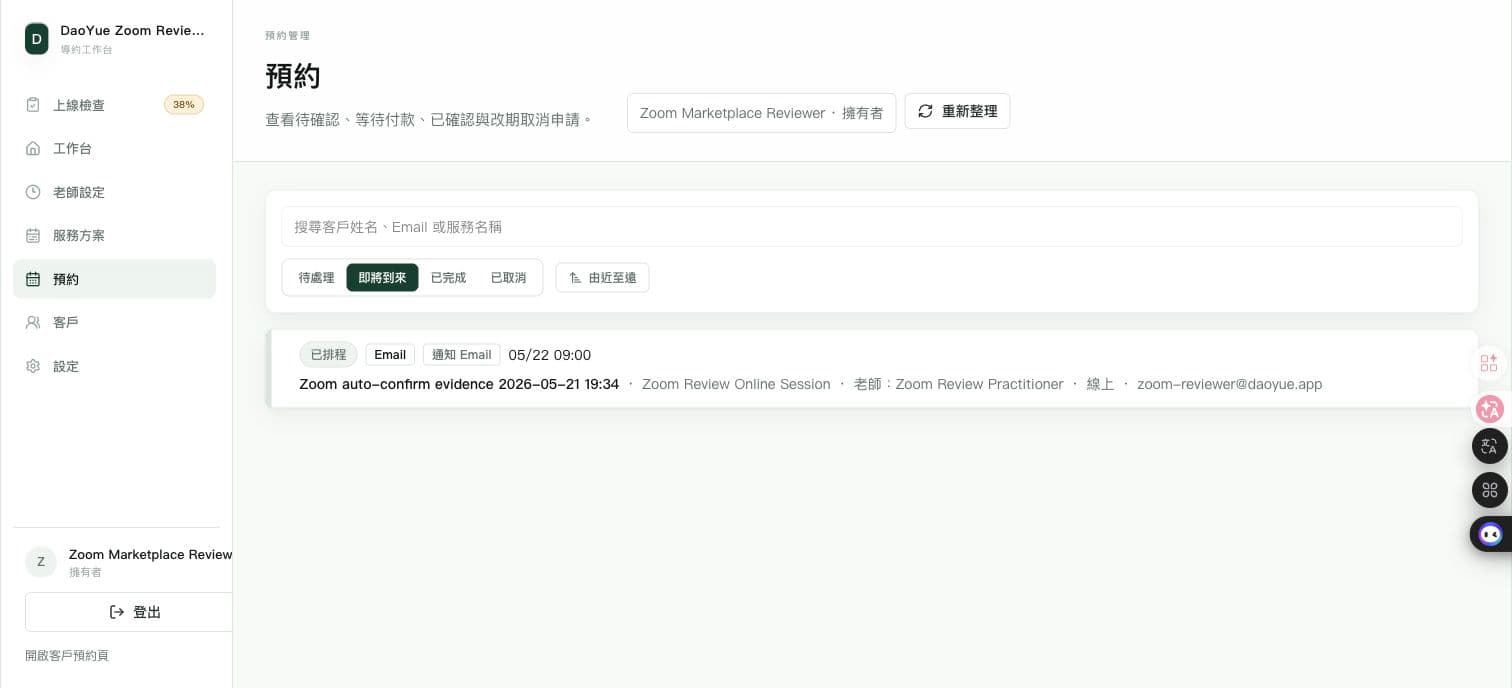
- 7Switch to the Upcoming / 已排程 tab if needed, then open the newly created booking from the bookings list.
- 8Confirm the booking is already confirmed and the private meeting details show Zoom join URL, meeting ID, and passcode.
No manual accept step or separate default-provider setup is required for the review service. DaoYue creates the scheduled Zoom meeting at public booking submission time because the sandbox service is auto-confirmed, uses Zoom as the default meeting tool, and does not require payment.
For app-update review, this sandbox authorizes Zoom through the Development Client ID so reviewers can test newly requested Calendar scopes before the production update is approved. Reviewers do not need a separate OAuth URL; the pre-review reset makes the DaoYue Connect Zoom entry the expected starting point, and it redirects to Zoom with the development client id.
This update creates a Zoom Calendar event through /calendars/{calId}/events. It does not create the separate Zoom Events product through /zoom_events/events and does not request zoom_events:* scopes.
Calendar app-update scope test plan
- 1After Connect Zoom succeeds, the review sandbox automatically enables Zoom Calendar event mirroring for a calendar-capable Development OAuth grant. Confirm the provider card shows the mirror as enabled. If no calendar name is shown yet, the first mirrored booking uses calendar:read:list_calendar_lists to select a writable Zoom Calendar automatically.
- 2Do not continue if the provider card does not show the mirror as enabled before booking; notify DaoYue instead.
- 3Submit a new Zoom Review Online Session booking from https://daoyue.app/w/zoom-review, then open the booking detail. DaoYue creates the Zoom meeting and writes one privacy-safe Zoom Calendar event, exercising calendar:write:event.
- 4Use the booking reschedule/admin change flow to move the confirmed booking to another time. The stored Zoom Calendar event is updated instead of duplicated, exercising calendar:update:event.
- 5Cancel the same confirmed booking from the admin booking detail. The stored Zoom Calendar event is removed from the reviewer Zoom calendar, exercising calendar:delete:event.
- 6Confirm the Calendar event content contains service name, booking identifier, time, timezone, Zoom join URL, meeting ID, and passcode, and does not contain customer name, email, phone, LINE id, intake answers, or internal notes.
Support
Support case and email:[email protected]. Emailing this address opens a support case with the DaoYue support team.
Knowledge base and Zoom-specific user documentation: this page,https://daoyue.app/docs/zoom, explains adding, using, troubleshooting, and removing the Zoom integration.
Support hours: Monday to Friday, 09:00-18:00 Taipei time, excluding Taiwan public holidays.
First response SLA: one business day for standard support requests. Marketplace review blockers and production authorization issues are triaged as priority support requests.
Phone support, live chat, and community/forum support are not currently offered. All support requests should be sent by email so the team can track the case and respond with the relevant workspace context.
Please include your workspace slug, the affected booking time, the connected Zoom account label, and a brief description of the issue. Do not send OAuth tokens, client secrets, meeting passcodes, or private client notes by email.
解除 Zoom 連結
- 1在導約後台打開「老師設定」。
- 2選擇已連結 Zoom 的老師。
- 3在「線上會議工具」區塊點選「解除連結」。
- 4確認解除後,導約會刪除本地保存的 Zoom token,並停止用該帳號建立新的 Zoom 會議。
- 5也可以在 Zoom App Marketplace 進入 Manage → Added Apps,找到導約 app 後按 Remove。
Zoom App Marketplace:https://marketplace.zoom.us/
資料與權限說明
導約基本 Zoom meeting 整合要求的 Zoom 權限為 meeting:write:meeting、meeting:update:meeting、meeting:delete:meeting 與 user:read:user。
user:read:user 只用於讀取授權使用者的基本帳號資料,讓後台顯示已連結帳號並避免同一個 Zoom 使用者重複綁定。meeting:write:meeting 用於線上預約正式成立時建立排程會議;meeting:update:meeting 用於後台核准改期後更新同一個會議時間與長度;meeting:delete:meeting 用於後台核准取消後刪除該預約對應的 Zoom 會議。
若工作室另外啟用 Zoom Workplace Calendar event mirror,導約會要求 Calendar event 相關權限,用來列出可寫入的 Zoom Calendar,並為已正式成立的 Zoom booking 建立、更新或刪除 privacy-safe Calendar event。既有 meeting-only 授權不會被視為壞掉,但需要重新授權後才能啟用 Calendar event mirror。
導約不會讀取 Zoom 錄影、聊天內容或聯絡人清單,不會把 Zoom token 或私密會議連結提供給無關第三方,也不會將 Zoom 資料用於廣告投放。